Web development
Web Development Services
Websites and customer-facing web applications, built through professional web development services in Jaipur, India, on Laravel, Node.js or NestJS at the back, with React, Next.js, Vue or Angular at the front, or on WordPress and Shopify where a content team needs to run the site without us. Development starts at $399 USD, with maintenance from $49 USD a month.
The first decision
Content-managed site, or a custom application?
Almost every website project turns on one question, and it is not which framework to use. It is whether the site mainly publishes content that other people will maintain, or whether it does work for a visitor that has to be programmed.
Getting that wrong is expensive in both directions: a marketing site rebuilt from scratch when a content management system would have done, or a booking and quoting tool bolted onto WordPress with a dozen plugins that fight each other at every update.
A quick way to settle it before anyone quotes: list what the site has to do, then read the list back. If most of the items are publish, edit, list and link, you want a content management system. If several of them contain the word if — if the customer is signed in, if the slot is still free, if the order is above a threshold — you are describing an application.
Our web development services in Jaipur, India focus on selecting the right development approach based on your website's functionality and business requirements.
When WordPress is right
Choose WordPress when the site is mostly pages, posts and landing pages, and the people adding them are marketers rather than developers. You get an editor your team already recognizes and an enormous plugin ecosystem. The trade is maintenance discipline: every plugin is code you did not write, running with full access to your site, and each one has to be updated and re-tested. We keep plugin counts deliberately low and build the theme properly rather than assembling the site from a page builder that no one can later untangle.
When Shopify is right
Choose Shopify when you sell physical products and would rather someone else own payments, tax calculation, fraud screening and checkout compliance. That is a large amount of liability handed off for a platform fee. The constraint worth knowing before you commit is the checkout: it is customizable only within the limits Shopify allows, and unusual pricing rules, quoting flows or B2B approval steps often sit awkwardly inside it. We build Shopify themes and the apps around them, and we say plainly when a requirement is going to run into that ceiling.
When a custom build is right
Once the site does something rather than describes something — real availability rules on a booking calendar, pricing that depends on who is signed in, a customer portal, a multi-step application form that talks to your back office — a content management system starts being fought instead of used. That is the point to move to Laravel, Node.js or NestJS, with React, Next.js, Vue or Angular in front of it. If the system you have in mind is an internal CRM or ERP rather than something your customers touch, our custom software work covers that instead.
The hybrid that is often the real answer
These are not exclusive choices. A common shape is a custom Laravel application for the part that carries the logic, with a content management system — WordPress, or a small custom CMS built into the admin panel — behind the marketing pages and the blog, so the content team is never blocked on a deployment. Headless setups, where the CMS serves content over an API into a Next.js front end, work well when the same content has to appear in more than one place, and are needless overhead when it does not.
Rendering
Server-rendered or single-page, and what it does to search
A server-rendered page arrives at the browser as finished HTML: Blade templates from Laravel, or server components in Next.js. A single-page application sends a near-empty document plus JavaScript, and the page is assembled in the browser afterwards. Both are legitimate. They are not interchangeable.
| Approach | Where it fits | What you take on |
|---|---|---|
| Server-rendered HTML Laravel Blade, Next.js server components |
Anything that has to be found, shared or summarized: marketing pages, blog, product and service pages, location pages. | Interactivity is added deliberately, piece by piece, rather than coming free with the framework. |
| Server-rendered with client-side islands | Content sites with a few genuinely interactive parts — a faceted filter, a cart, live search, a multi-step form. | Two ways of working in one codebase. It needs a clear rule about which side owns the state. |
| Client-rendered single-page app React, Vue, Angular |
Dashboards, portals and tools behind a sign-in, where nothing is indexed and responsiveness matters more. | Crawlers and link-preview bots see an empty document first, so it is the wrong choice for public pages. |
Google can execute JavaScript, but it does so in a second pass after the initial crawl, which adds delay and adds a way for things to go wrong. Other crawlers are less forgiving. Bing, the link-preview bots behind social platforms and messaging apps, and the AI answer engines that summarize pages all deal with plain HTML far more reliably than with a client-rendered page.
Our default for anything that has to be found is server-rendered HTML, with client-side behavior added where it earns its weight. The question we ask of every interactive component is not whether it is possible, but whether the page is worse without it.
Behind a login the calculation reverses, and a great many sites are best served by both: server-rendered public pages, a single-page application behind the sign-in. The two halves can share a database, a domain and an API without sharing a rendering strategy, which is usually cheaper than forcing one approach across the whole site.
One consequence worth stating plainly, because it catches people out on a rebuild: moving a public page from server-rendered to client-rendered can cost you visibility even though nothing about the content changed. If search traffic is part of why the site exists, that decision belongs in the specification, alongside the technical SEO work, not in a framework preference settled later.
Under load
What “scalable” actually means in practice
Scalable is often used as a synonym for fast. It is not. It means the site keeps its response time as traffic grows and as your data grows, and it comes down to three unglamorous engineering habits rather than to a bigger server. Sites that fall over on a launch day or a campaign spike usually do so because of an unbounded query or a missing database index, not because the hosting was undersized.
Caching, in layers
A page that never changes for an anonymous visitor should be served from a CDN edge and never reach your application at all. Below that sits an application cache — commonly Redis — holding query results and rendered fragments, and below that the framework caches for config, routes and views. The part that takes real thought is not adding cache; it is deciding what clears it and when, so an editor publishing a price change sees it live straight away rather than in an hour.
Queues for slow work
Anything slower than a page should not happen during a page. Confirmation emails, PDF generation, image resizing on upload, pushing a new inquiry into a CRM, calling a payment or shipping API: all of it goes onto a queue and is handled by a worker process, so the visitor gets their response immediately and a third-party outage slows a background job rather than taking the checkout down with it. Failed jobs are retried and recorded rather than lost silently.
Database load
The database is where most performance problems actually live. That means eager-loading relationships instead of firing one query per row in a loop, indexing the columns you filter and sort on, paginating rather than selecting everything and trimming it in code, and watching query counts on the pages that matter as the table grows from a thousand rows to a million. Where reads dominate heavily, read replicas come next, but only after the straightforward work has been done.
The page that falls over is rarely the home page. A home page looks the same to every anonymous visitor, so it can be served from cache before it ever reaches your application. The pages that hurt are the ones that cannot be: a filtered listing where every combination of filters is its own URL, a cart, an internal search, anything behind a sign-in. Those are the pages we watch query counts on, because a launch day or a campaign lands on them rather than on the one that was easy to make fast.
Our web development services in Jaipur, India are designed to support growing traffic and data while maintaining reliable website performance.
Build requirements
Accessibility and Core Web Vitals, not afterthoughts
Both of these are usually raised after launch, when a compliance question arrives or a performance report goes red, and both are cheapest to deal with while the templates are still being written. We put them in the specification at the start.
Accessibility is a build requirement
Accessibility is markup, and markup is decided at build time. Retrofitting it afterwards usually means rewriting the templates, which is why we treat WCAG 2.2 AA as part of the specification rather than a later audit item.
- Headings in real order, and landmarks that describe the page
- Every control reachable by keyboard, with a focus state you can see
- Labelled form fields and errors announced to screen readers
- Text contrast checked against the design, not assumed
- Alt text written for meaning, and decorative images marked as such
An automated scan finds the mechanical failures — a missing alt attribute, a contrast ratio under the threshold — and stops there. Keyboard order, whether a label describes the field it sits beside, and whether an error is announced at all are checked by hand, because no tool reads meaning.
Core Web Vitals, designed in
The three field metrics Google reports — largest contentful paint, interaction to next paint, cumulative layout shift — are mostly won or lost in decisions made while building, not in a plugin installed later.
- Hero images sized properly, served as WebP or AVIF, and preloaded
- Width and height on every image so nothing jumps as the page loads
- Fonts self-hosted with a sensible display strategy, not left to block
- Non-critical JavaScript deferred; unused bundles removed rather than minified
- Reserved space for embeds, banners and anything injected after load
- Third-party tags questioned individually, because each one costs you a metric
A lab score on a developer machine is not the measurement that counts. The field data Google reports comes from real visitors on real phones and networks, which is why the tag manager, the chat widget and the tracking pixels added after launch can undo a good build without anyone touching the code.
How a project runs
Discovery to launch
Discovery
We agree what the site has to do, who maintains it afterwards, and which pages carry the commercial weight. This is where the CMS-or-custom decision gets settled, in writing, with the trade-offs stated.
Design and prototype
Key templates are designed and reviewed as clickable pages rather than flat images, so layout, spacing and behavior on a phone are agreed before anything is coded.
Build on staging
Development happens on a password-protected staging site you can visit at any time, with the code in version control and changes deployed in reviewable increments.
Content and migration
Real content goes in, not placeholder text. On a rebuild this is also where old URLs are mapped to new ones so existing search rankings and inbound links survive.
Pre-launch checks
Cross-browser and mobile testing, forms confirmed end to end, accessibility and performance passes, analytics and Search Console connected, sitemap and robots rules verified.
Launch and aftercare
DNS and certificates cut over at an agreed time, redirects go live with the site, and we watch logs, form submissions and indexing for the first weeks afterwards.
Your side of it
What we need from you, and where projects stall
Development is rarely the thing that holds a website up. Access requests and page content are, and both sit on your side of the line. Gathering them in the first week costs an afternoon; gathering them in the last week costs the launch date, because several of them depend on a third party with its own queue.
Our web development agency works with clients to coordinate the required content, access and project information so development can progress efficiently.
What to have ready
- Domain and DNS access — the registrar login, or a named person who can change records on cut-over day
- Page content — final copy, or an owner and a date for each page that is still being written
- Brand assets — the logo in vector form, fonts with their licenses, and photography you hold the rights to use
- Product or service data — a spreadsheet is fine; how the columns are structured matters more than the format
- Third-party accounts — payment gateway, sending domain for email, analytics, CRM, with credentials issued in your name
- One named approver — somebody who can settle a disagreement about a page without another meeting
Where projects actually stall
- Content arriving in fragments. A template with half its sections written cannot be reviewed honestly, because the layout looks fine while it is half empty. We build each template against real content for that reason.
- Review by committee. Feedback arriving from several people across several days, some of it contradictory, turns one round of changes into three. One consolidated list per round, from one owner, is faster and cheaper.
- Access asked for late. Verifying a sending domain, getting a payment gateway approved and moving DNS all run on somebody else's timetable, so we raise them in week one rather than the week of launch.
- A page added late is not always a small page. Another page costs very little when it reuses a template that already exists, and a good deal more when it needs a new one. We say which of the two it is when it is asked for, rather than at the deadline.
After launch
Hosting, maintenance and who owns the code
Hosting has to match the build
A Laravel application is not just PHP files on a shared host: it wants a supported PHP version, a queue worker kept running and a scheduler firing every minute, and a lot of budget hosting can run none of those. A Next.js or Node application needs a Node runtime or a platform built for it.
WordPress is genuinely happy on managed WordPress hosting, and there is no merit in putting it anywhere more complicated. We size hosting to the application rather than to a package name, set up TLS, backups and staging alongside it, and hand you the account details rather than keeping them.
| If the site is built on | The host has to provide | The trap |
|---|---|---|
| Laravel | A supported PHP version, Composer, a queue worker kept alive, a scheduler running every minute, and writable storage. | A cheap plan that advertises PHP but allows no long-running processes, so queued jobs and scheduled tasks silently never run. |
| Node.js, NestJS or Next.js | A Node runtime plus something that restarts the process when it exits, or a platform that handles both for you. | Deploying a Next.js site as static files and losing the server rendering it was chosen for. |
| WordPress | Managed WordPress hosting with staging, automatic backups, and caching that understands logged-in users. | No staging site, so plugin updates are tested on the live site and rolled back in public. |
| Shopify | Nothing — the platform hosts the store. You keep the domain and the DNS. | Treating installed apps as part of the platform; each is a separate product with its own reliability and its own subscription. |
Where a project needs more than a single server — a deployment pipeline, environment parity, monitoring and alerting — that work is covered by our cloud and DevOps service rather than folded silently into a website quote.
As a web development company, we align hosting and infrastructure with the specific technical requirements of each application.
Maintenance is the part people underestimate
A website is not finished at launch; it is exposed at launch. Dependencies get security advisories, PHP and Node releases reach end of life, plugins update and occasionally break each other, certificates renew, and a form that quietly stops sending mail can go unnoticed for weeks.
Our maintenance plans start at $49 USD a month and cover core and dependency updates applied on staging first, backups that are actually restored to prove they work, uptime and certificate monitoring, and a modest allowance of content edits, with anything larger quoted before it is started.
You own it
The source code lives in a Git repository in your organization, the domain stays in your registrar account, hosting and DNS are in your name, and every credential is handed over at the end. There is no proprietary builder that only we can operate and no license that stops another developer picking the project up.
If you decide to move on, the handover is a repository, a database dump and a README. That is how it should be, and it is worth confirming with any agency before you sign.
Our web development services in Jaipur, India are focused on delivering maintainable websites and applications with complete ownership and long-term flexibility. As a web development agency, we ensure your team can independently manage and maintain the project after handover.
Pricing
Straightforward numbers
Website development
Starts at
A responsive, search-ready business website. The final figure depends on page count, integrations and how much bespoke functionality sits behind the pages. Larger builds and web applications are quoted per project, with the scope written down first.
Website maintenance
Starts from
Updates, security patches, monitored uptime, tested backups and small content changes. Teams that want continuing feature work take a development retainer with agreed hours each month instead.
All prices in US dollars (USD). We can invoice in GBP, EUR, AUD or INR on request.
Web development FAQs
Ping us for your IT solutions
Tell us what the site has to do
Send us the pages you have in mind, the features you are unsure about, or simply the site you want replaced. We will come back with the build approach we would recommend, the reasoning behind it and a fixed quote. See the full list of services if you need design, cloud or search work alongside the build.
Mon–Fri, 09:00–19:00 IST (UTC+5:30) — 4+ hours of live overlap with US Eastern; full overlap with UK and EU mornings.
Proof of work
Web Development projects we have delivered
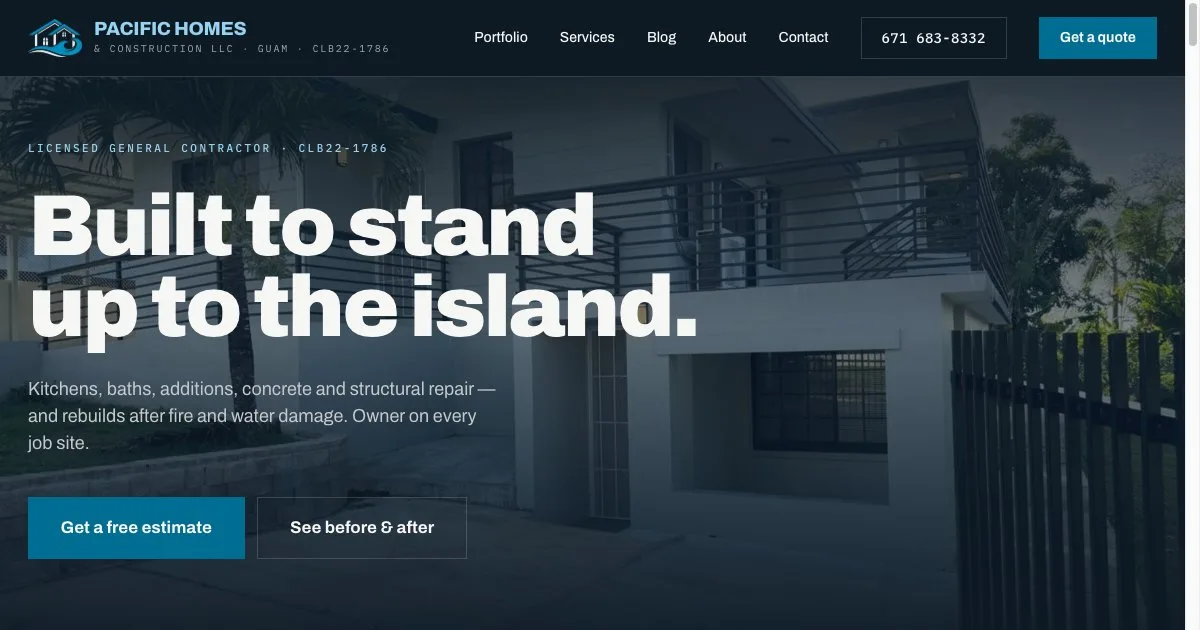
Contractor website with a before-and-after project gallery
Pacific Homes & Construction · Guam
A website for a licensed Guam general contractor, built around a fifteen-project before-and-after gallery, a page for each trade and phone, WhatsApp and email enquiry paths.
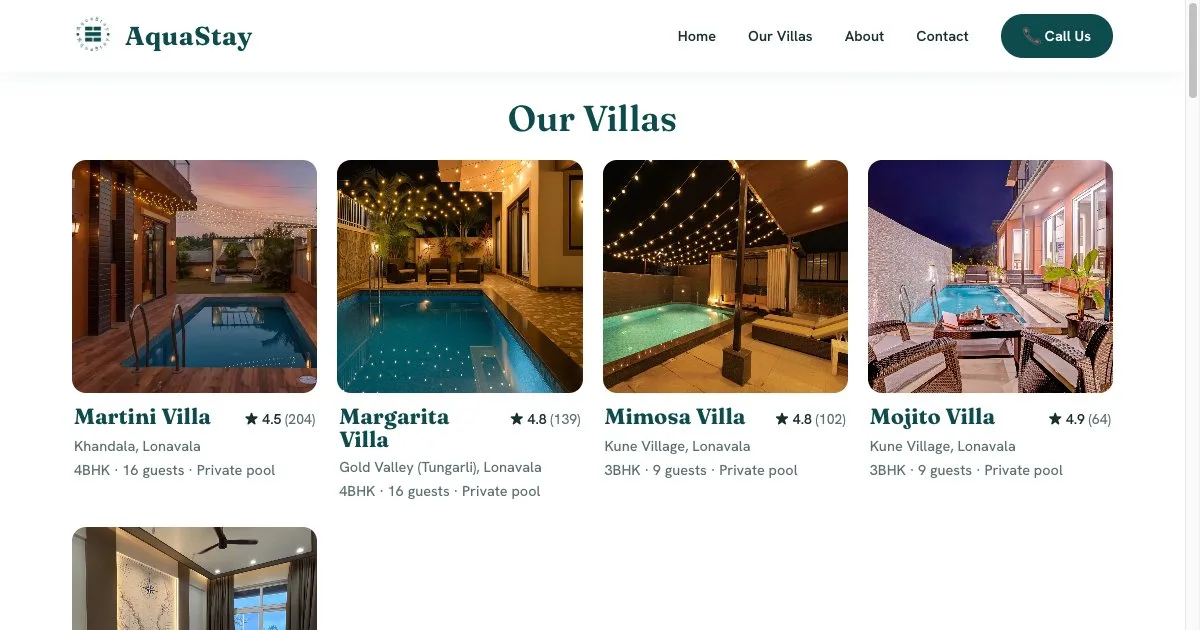
Villa rental brand site with direct enquiries and aggregated reviews
AquaStay · Lonavala, India
A brand website for a five-villa rental business in Lonavala and Khandala: a page per villa with capacity and amenities, 529 guest reviews brought together from Airbnb and MakeMyTrip, and WhatsApp and phone enquiries.

Development partnership across an innovation group's ventures
Bishvili Innovation Group · Vienna, Austria
Ongoing development partnership with Eden Biniaurishvili's Bishvili Innovation Group, delivering web and software work across the group's technology, real estate and lifestyle ventures.
Get a quote
Tell us about your Web Development project
A scoped estimate within one business day. No obligation.
Request a free quote
Hourly engagements from $25/hour · websites from $399 · maintenance from $49/month. Quoted in USD; GBP, EUR, AUD and INR on request.
Related services
Mobile App Development
Native and cross-platform iOS & Android apps built by the best app developers, with React Native and Flutter.
Custom Software
Custom software development for bespoke CRM, ERP and SaaS platforms, engineered around your exact workflow.