
Akshara - Library & Study Hall Management
Run your library or study hall from one screen — students, seats and shifts, monthly fees and dues, expenses and the numbers that tell you how the month went.
Who it's for
Built for places where students pay for a seat
If people pay you monthly to sit and study, Akshara already knows how your month works.
Monthly members, fixed seats, a quiet room to keep full.
Morning, evening and night shifts priced differently.
A study space attached to a coaching centre, billed separately.
Two, five or ten halls under one account, each with its own setup.
Sound familiar?
Running a library on registers and chat messages
Everything lives on paper
Admissions in a notebook, fee reminders over WhatsApp, receipts on loose slips. At month end nothing adds up.
Dues you can't see
Who paid, who's overdue, who already paid three months ahead? Without a ledger every answer is a guess.
Seats that clash
Two students on one seat, a shift sitting half empty and nobody noticing. Occupancy has to be live, not remembered.
What's inside
One system for the whole operation
Every part of running a study hall, built to work together — not eight spreadsheets pretending to.
Students
Full profile with KYC details, documents and a printable ID card. Bring an existing roster in from CSV and export it back, filtered.
Fees & dues
Billing cycles anchored to each student's joining date, part payments, advances, discounts and printable receipts.
Seats, halls & shifts
Halls with your own seat numbering, fixed or floating seats, shift timings and a price per shift.
Expenses
One-time and recurring costs with categories, vendors and part payments — so you see profit, not just income.
Admissions by QR
Print one QR code. Prospects scan it, see your shifts and free seats, and send an inquiry straight into your pipeline.
Staff & roles
Invite co-owners and staff, build your own roles from a permission list, and assign them per library.
Multiple libraries
Switch between branches from the header. Each branch keeps its own seats, shifts and fees.
Dashboard & reports
Dues, occupancy and daily cash flow at a glance — then revenue, utilisation and member growth over time, exportable.
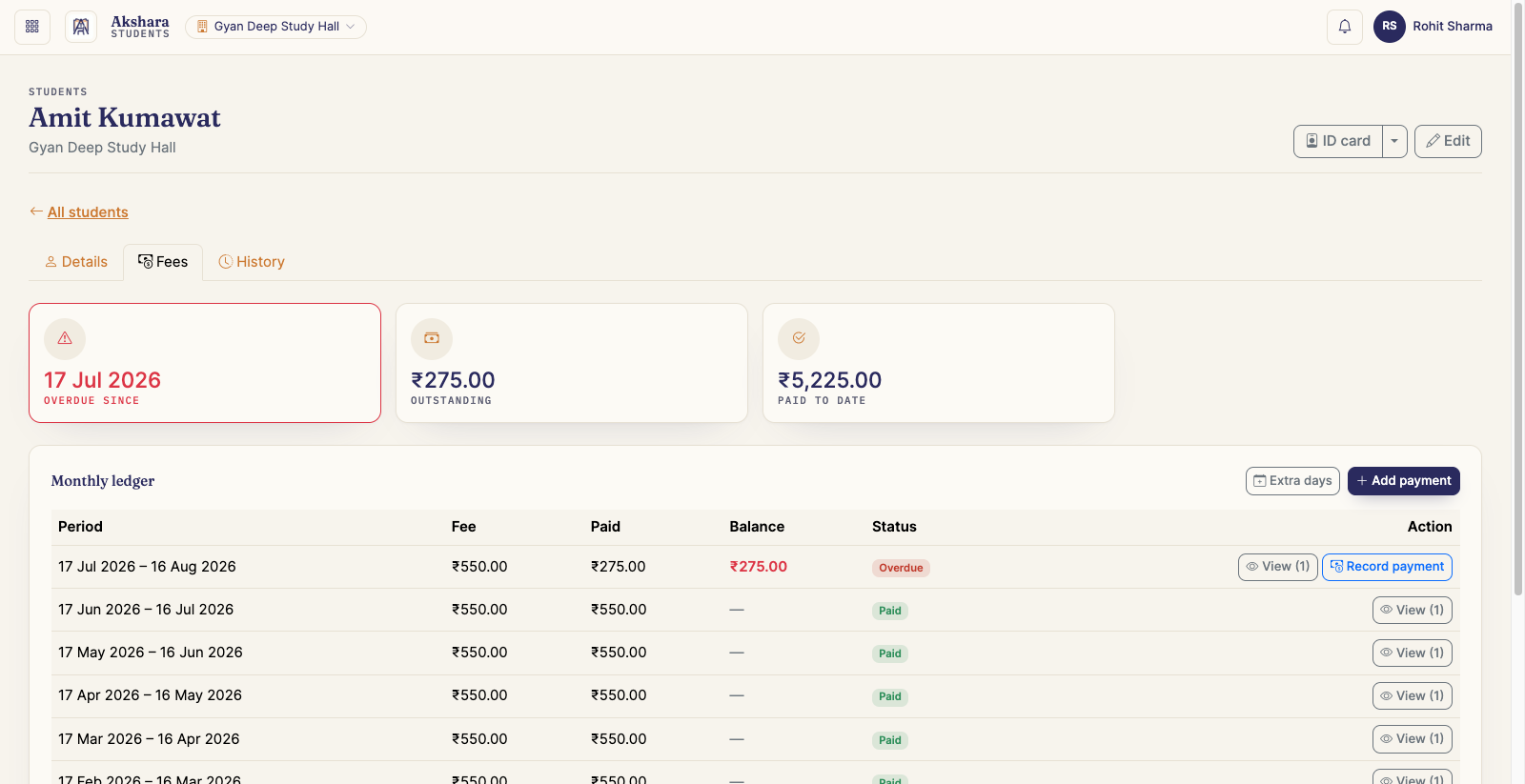
Fees & dues
Billing that matches how libraries actually charge
Nobody joins on the 1st. Akshara bills every student on their own cycle and keeps the ledger straight even when a payment is partial, early or paused.
- Cycles run from each student's joining date — join on the 18th, bill on the 18th.
- Take a part payment now and the rest later, or collect several months in advance in one go.
- Per-student discounts, fixed or percentage, for the first month or for good.
- Put a paid-up student on hold while they travel — every later cycle shifts with it.
- Print a receipt for any collection, numbered per library.
- Filter the roster by overdue or due soon, and act straight from the row.
Seats & shifts
Every seat accounted for, every shift priced
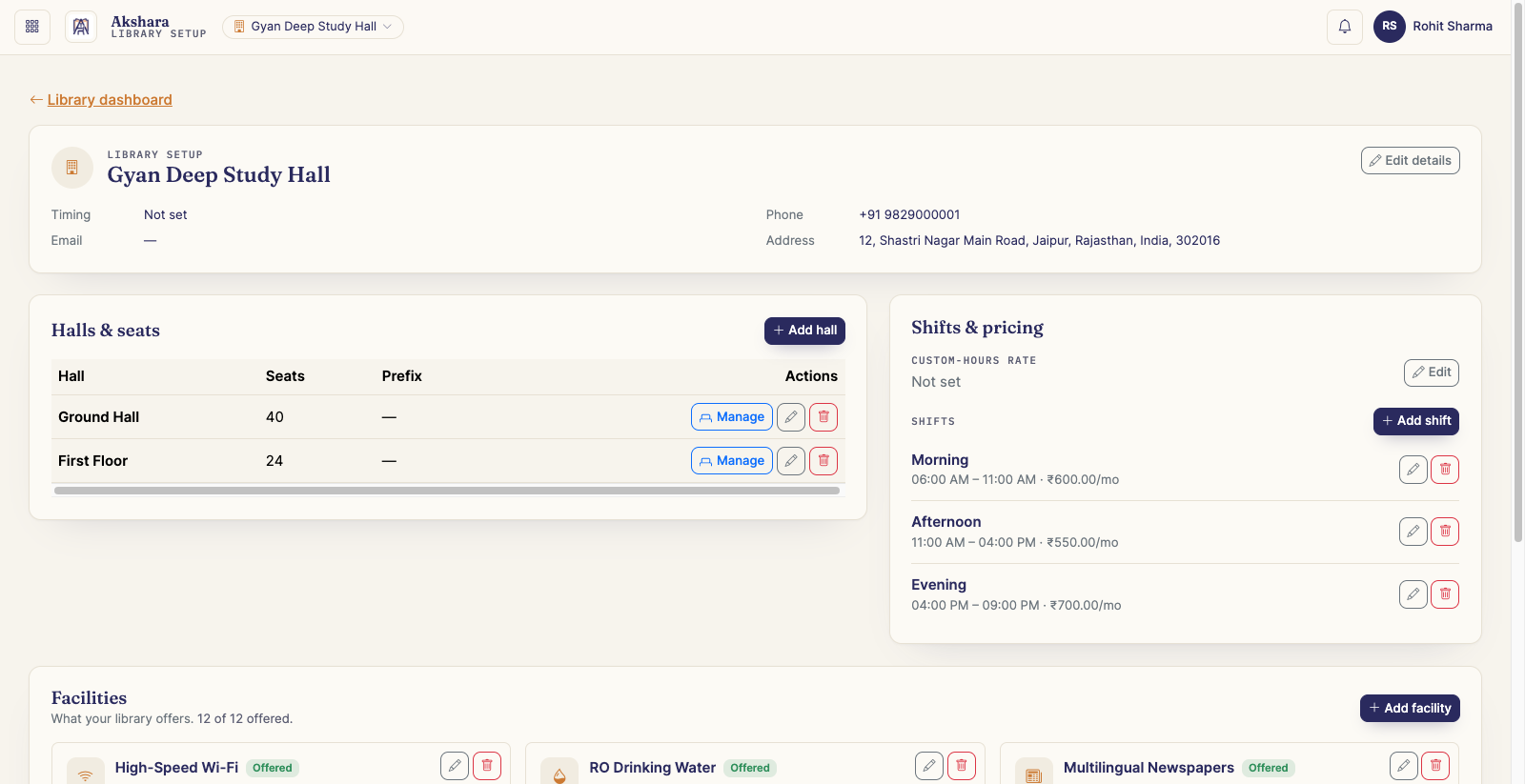
Set the hall up once the way your boards already read, then let occupancy keep itself current as students come and go.
- Halls with your own numbering — 1 to 40, A1 to A20, whatever is painted on the desks.
- Split a seat into sub-seats when two students share it, and merge it back later.
- Fixed seats stay reserved for one student; normal seats float across shifts.
- Shift timings sit inside your business hours, each with its own price.
- Occupancy updates as students are enrolled, held or released.
- Facilities you offer — wifi, lockers, drinking water — shown on your public page.
Admissions
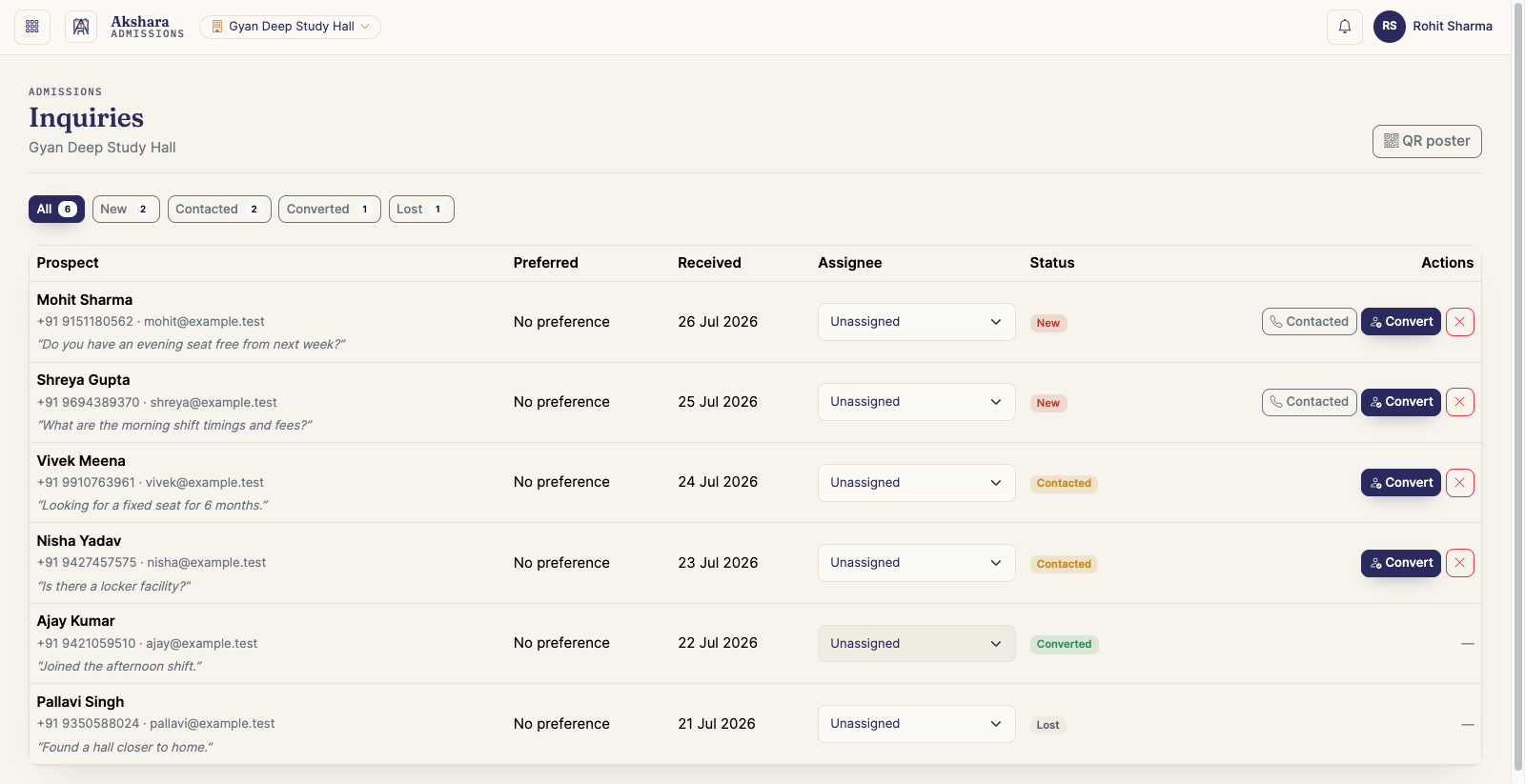
One printed QR code does your front desk
Stick it on the door, on your board, on a pamphlet. Anyone who scans it lands on your library's own page — and anyone who fills the form lands in your admissions pipeline.
- Your public page shows facilities, shift timings and how many seats are actually free.
- You decide whether fees and seat counts are visible — toggle either off.
- Inquiries arrive with spam throttling already handled, no plugin to configure.
- Move an inquiry through your own follow-up stages instead of a notebook.
- Convert an accepted inquiry straight into a student — no re-typing the details.
- The notification bell tells you the moment a new inquiry comes in.
A look inside
See it in action
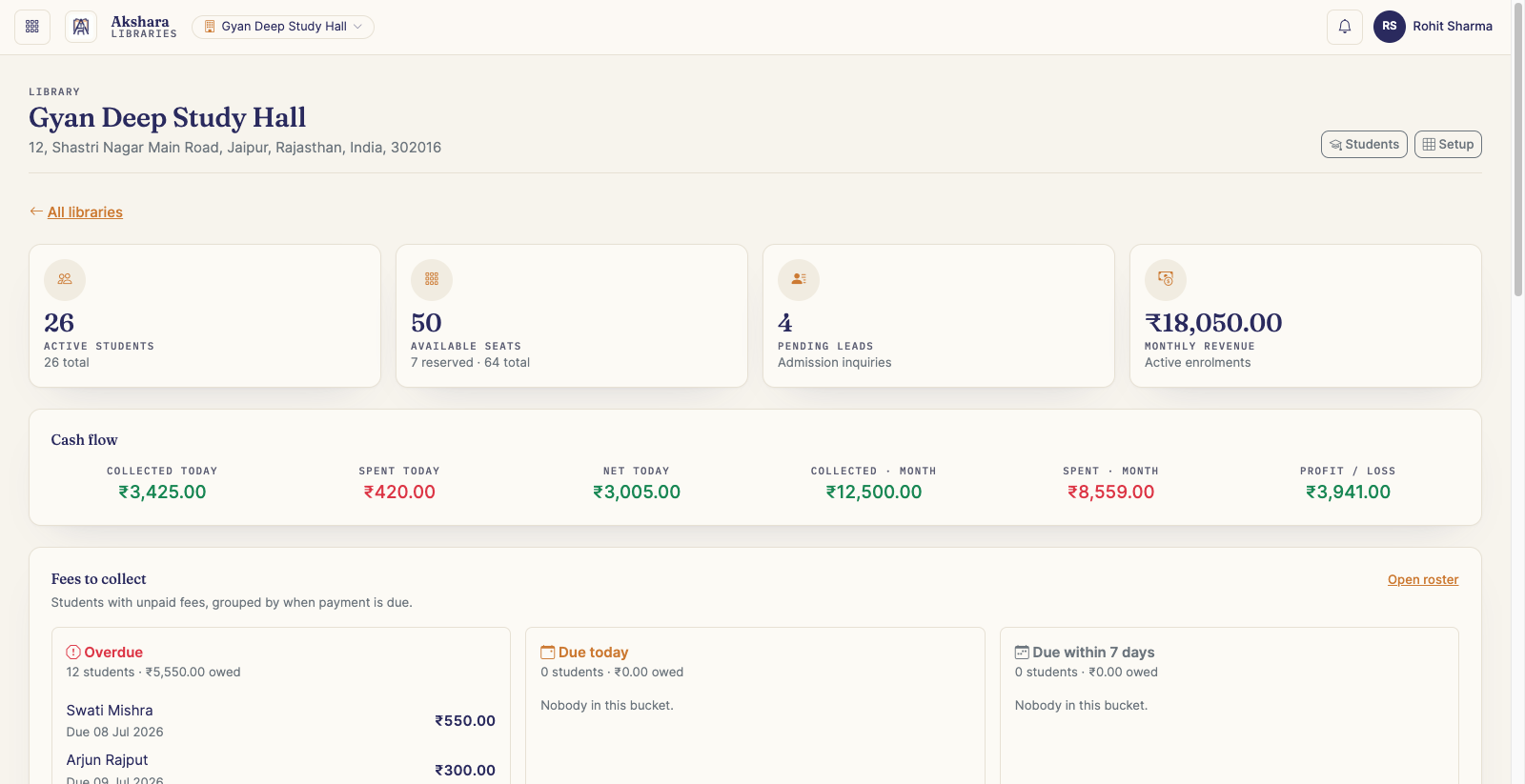
Library dashboard
Students, seats, dues and the day's cash flow
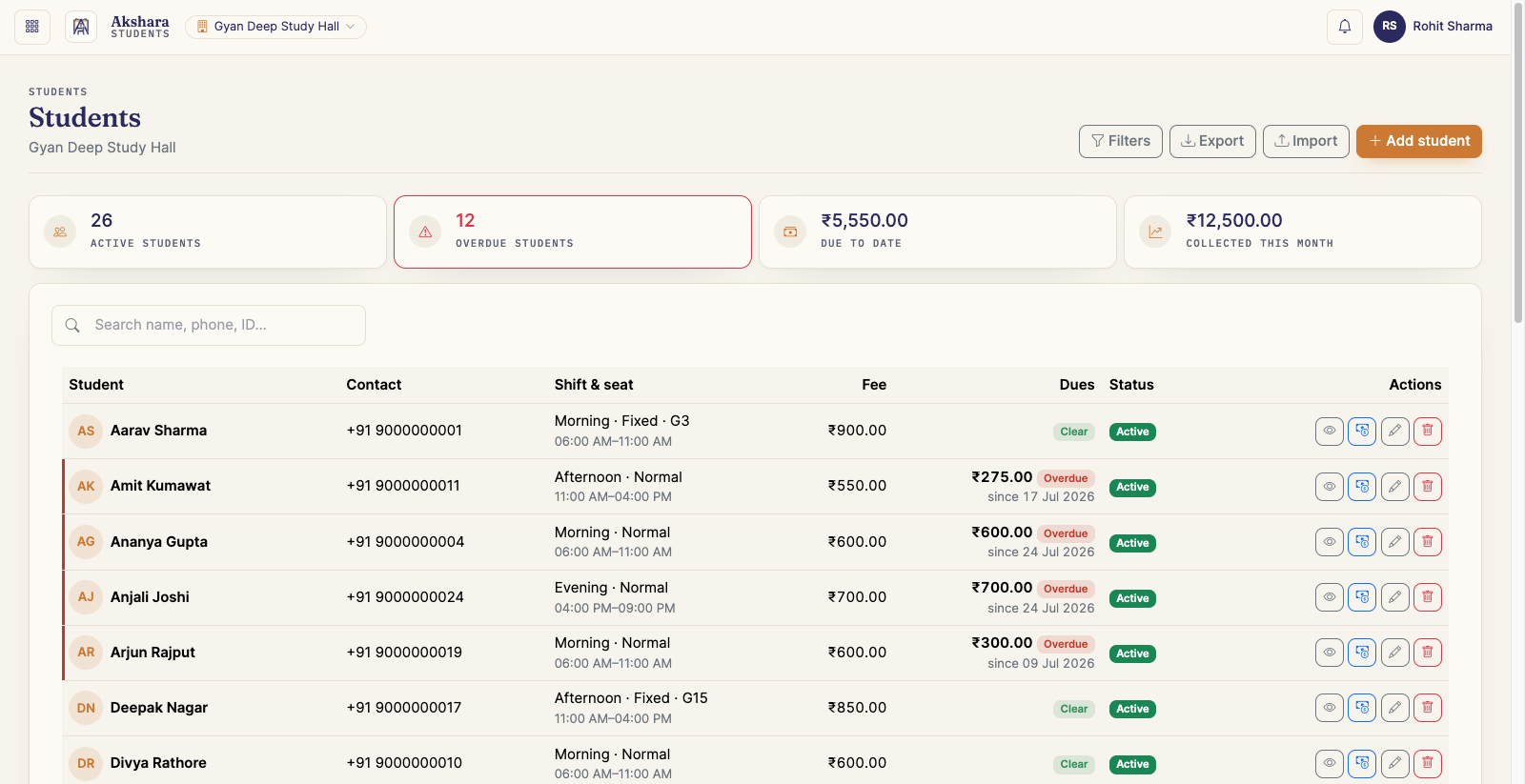
Student roster
Search, filter by dues and act from the row
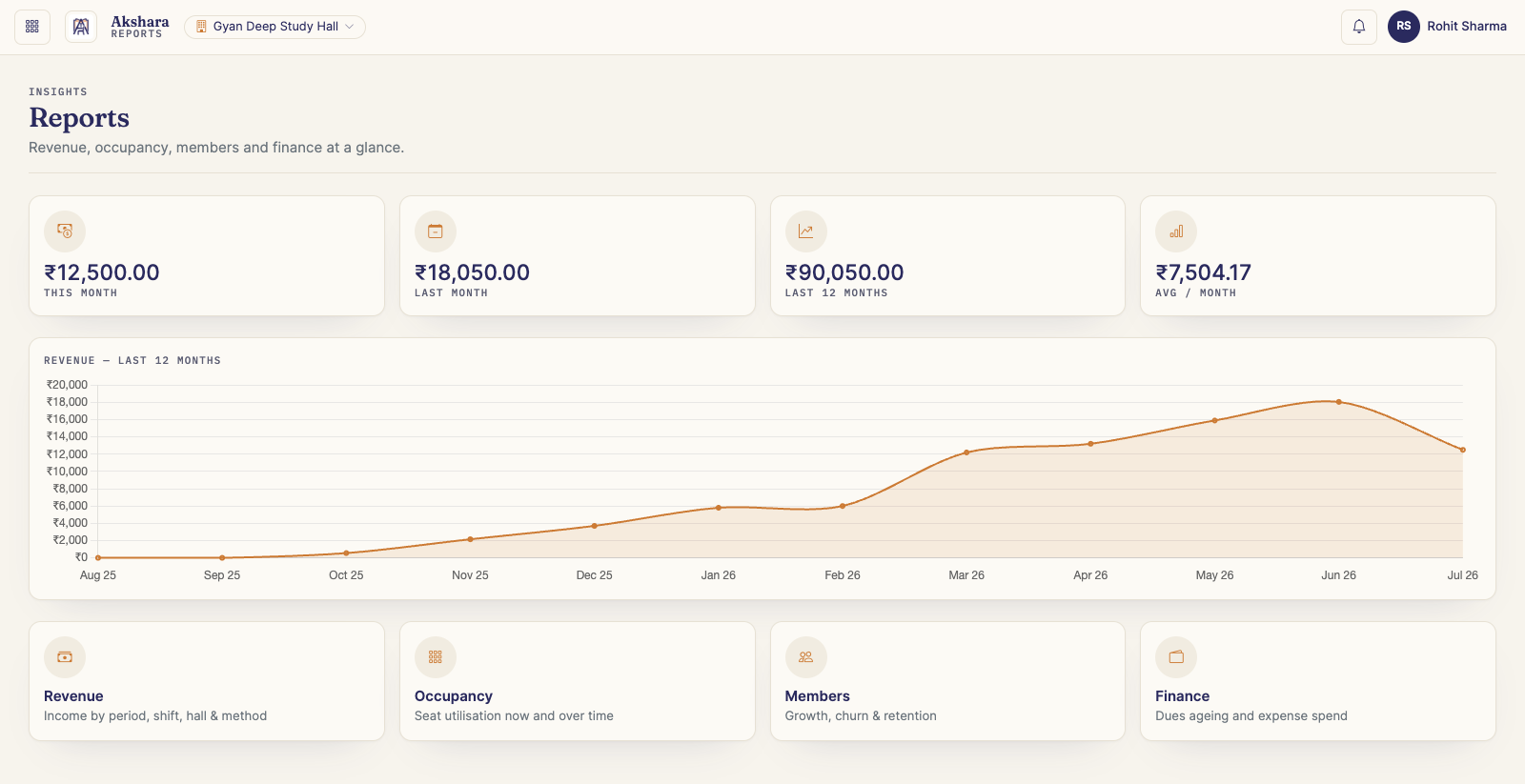
Reports
Revenue, occupancy, members and finance
Library dashboard
Students, seats, dues and the day's cash flow
Student roster
Search, filter by dues and act from the row
Reports
Revenue, occupancy, members and finance
The full list
Everything you get
No modules to buy separately, no feature you unlock later. This is what is in the product today.
Students
- Full profile — photo, contact, address and KYC details
- Private document uploads, visible only to your account
- Printable student ID card
- Enrol on a shift and a seat, fixed or floating
- CSV import to bring an existing roster in
- Filtered CSV export of whatever the list is showing
- Put an enrolment on hold when a student travels
Fees & billing
- Billing cycles from each student's joining date
- Invoices generated automatically each cycle
- Discounts per student — fixed or percentage
- First-month-only or lifetime discounts
- Extra days when a student travels, shifting later cycles
- Monthly fee overridden per student where you agreed one
Payments & receipts
- Full, partial and advance payments
- Several months collected in one go
- Cash, UPI, card or bank transfer recorded per payment
- Reference note and proof attached to a collection
- Printable receipts, numbered per library
- Dues roster with overdue and due-soon filters
- Edit or remove a payment, with totals re-derived
Seats, halls & shifts
- As many halls per library as you need
- Your own seat numbering — 1-40, A1-A20, anything
- Split a seat into sub-seats and merge it back
- Fixed seats reserved for one student
- Normal seats that float across shifts
- Business hours, with shifts priced individually
- Occupancy that updates itself on every change
Expenses
- One-time costs and recurring ones
- Any month interval — monthly, quarterly, yearly
- Categories and vendors you define
- Part payments against a single expense
- A month view of everything spent
- Fees against expenses on the dashboard
Admissions
- One printable QR code per library
- Public page with facilities, timings and free seats
- Show or hide fees and seat counts as you prefer
- Inquiry form with spam throttling built in
- A pipeline with your own follow-up stages
- Convert an inquiry into a student in one step
Reports & insights
- Revenue across the last 12 months, charted
- Income broken down by period, shift, hall and method
- Seat utilisation now and over time
- Member growth, churn and retention
- Dues ageing alongside expense spend
- Every report exportable
Team & roles
- Co-owners with equal access to the account
- Custom roles built from a permission list
- Assign a staff role per library
- Invite co-owners and staff by email
- Staff seat limits enforced by your plan
Your account & the app
- Library switcher in the header
- Installs as an app and updates in the background
- Light, dark and system themes
- Your timezone and date format on every screen
- Email verification and password reset by OTP
- Notification bell for inquiries and dues
Getting started
Up and running in an afternoon
Set up your library
Address and contact, business hours, halls and seats, shift timings and prices, the facilities you offer.
Add your students
Enter them or import a CSV, then assign a shift and a seat. Documents and ID cards come along for the ride.
Collect fees
Record payments in full, in part or in advance, apply a discount where you promised one, and hand over a printed receipt.
Watch the numbers
Dues outstanding, occupancy, collections against expenses — and an inbox of admission inquiries from your QR code.
Why owners pick it
Built for how a study hall really runs
Admissions that fill themselves
Print the QR once and stick it on the door. Every scan is a prospect who already knows your shifts, fees and free seats.
Installs like an app
Add Akshara to your home screen and it updates itself in the background. No app store, no downloads for your staff.
Your data stays yours
Every account is isolated at the database level. Staff see only the libraries and permissions you grant them, and student documents stay private.
Every change is on the record
An activity log tracks who changed what and when — useful the day a payment or a seat is disputed.
Your dates, your timezone
Dates and times display in the timezone and format you set, so a receipt reads the way your students expect.
Light and dark
A calm, readable interface on a laptop at the desk or a phone in your pocket, in whichever theme you prefer.
Akshara — frequently asked questions
Not running a library?
Need a custom solution?
Akshara began as one study-hall owner's problem, built properly. If your business still runs on registers, spreadsheets and chat messages, we can build the software that replaces them — whatever the trade.
- Custom web portals and internal tools built around how you actually work
- Mobile apps for Android and iOS
- Billing, inventory, bookings, membership or field operations
- White-label Akshara, or an entirely new product of your own
Built by Pingal IT Solutions
The same team that designed, built and runs Akshara takes on custom software for other businesses — from a single internal tool to a product you can sell.
Your students' data, handled properly
Every account is isolated, uploaded documents stay private, and staff only see what you grant them. Read exactly what we collect, how long we keep it and who it is shared with.
Ping us for your IT solutions
See Akshara on your own numbers
Tell us how your library runs today and we will walk you through Akshara with your own shifts, seats and fees on screen.