A developer ships a feature Friday afternoon. By Monday morning, 50 users have discovered a bug that costs the company $5 lakhs in lost transactions. The bug was obvious. It should have been caught before anyone used it.
This is what happens when testing is an afterthought instead of a core part of development.
In 2026, proper quality assurance and automated testing are not luxuries. They're foundational to shipping reliable software. Businesses that test thoroughly ship faster, spend less on fixing bugs, and build trust with users. Businesses that skip testing end up in chaos.
This guide explains what quality assurance actually is, why it matters, what types of testing your application needs, and how to build a testing strategy that scales.
The Cost of Bugs — Why Testing Isn't Optional
Consider the economics of bugs:
- A bug found during development costs $100 to fix (developer time)
- A bug found during QA costs $500 to fix (tester time + developer time + re-testing)
- A bug found in production costs $5000+ to fix (emergency response + lost revenue + reputation damage)
- A security bug in production can cost $1 lakhs+ (data breach response, legal, regulatory)
The cost multiplies by 50x as you move from development to production. This is why catching bugs early is economically critical.
Additionally:
- 43% of software failures are due to poor testing
- 60% of bugs could be prevented with proper automated testing
- Companies that invest in testing reduce defect rates by 40-80%
- Applications with high test coverage are 3x less likely to experience production failures
Testing is not a cost. It's insurance that prevents vastly larger costs.
What Is Quality Assurance (QA) — And Why It's Different From Testing
Testing is checking if the software works. Quality Assurance is the broader practice of ensuring the software meets standards and works correctly throughout development.
QA includes:
- Defining quality standards and requirements
- Planning what needs to be tested
- Executing tests (manual and automated)
- Reporting defects
- Verifying fixes
- Continuous process improvement
A QA engineer thinks holistically about quality. A tester executes test cases. The best teams have both.
The Testing Pyramid — What Types of Tests You Need
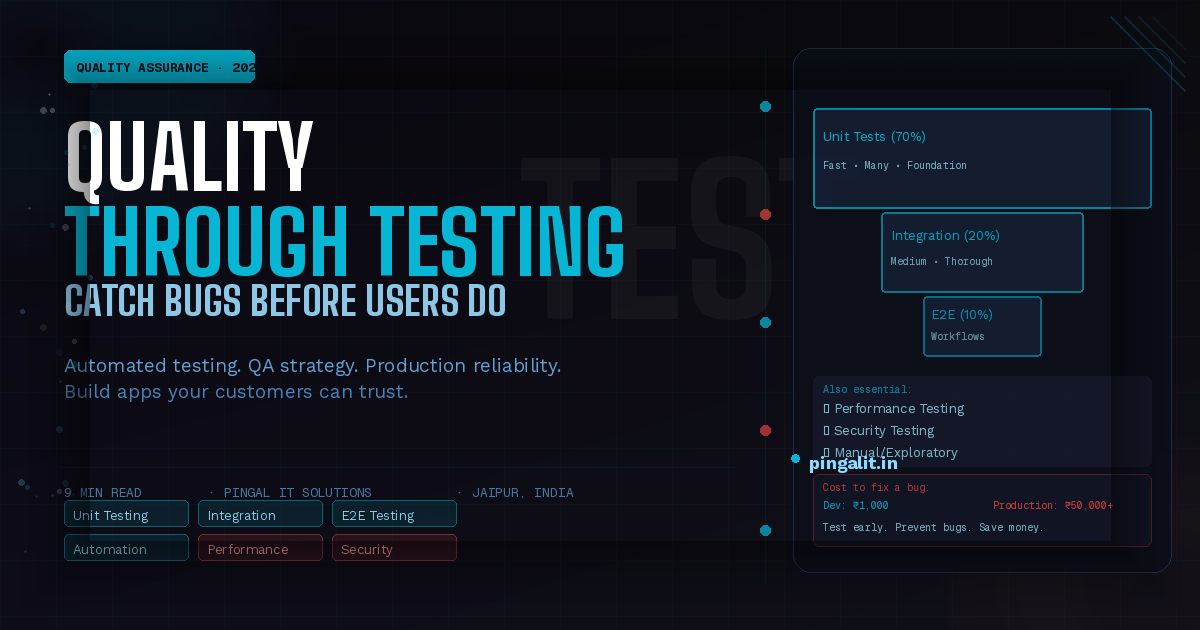
Not all tests are equal. A well-balanced testing strategy uses multiple types of tests, each serving a different purpose:
| Test Type | What It Tests | % of Tests | Cost Per Test | Execution Speed |
|---|---|---|---|---|
| Unit Tests | Individual functions/methods in isolation | 70% | Low | Fast (ms) |
| Integration Tests | Multiple components working together | 20% | Medium | Medium (seconds) |
| End-to-End (E2E) Tests | Full user workflows across the entire app | 10% | High | Slow (minutes) |
| Manual/Exploratory Tests | Human intuition finding edge cases machines miss | 5-10% | Very high | Varies |
The pyramid shape matters: many cheap, fast unit tests form the foundation. Fewer, more expensive integration tests in the middle. A small number of slow, brittle end-to-end tests at the top.
Many teams get this backwards — they rely on manual testing and a few E2E tests. This is slow and fragile. Flip the pyramid: heavy unit tests, solid integration tests, targeted E2E tests.
Unit Testing — The Foundation of Quality Code
Unit tests verify that individual functions work correctly in isolation. They're cheap to write, fast to run, and catch the majority of bugs.
A well-tested codebase has 70-80% code coverage — the percentage of code lines executed by tests.
Benefits:
- Confidence to refactor — if tests pass, you didn't break anything
- Documentation — tests show how code is supposed to be used
- Bugs caught early — before code reaches integration or production
- Design improvement — hard-to-test code is usually poorly designed
Tools: Jest (JavaScript), pytest (Python), JUnit (Java), RSpec (Ruby), PHPUnit (PHP)
Integration Testing — Verifying Components Work Together
Unit tests check individual functions. Integration tests check that those functions work correctly together — that the database query returns the right data, that the API serializes it correctly, that the frontend handles it properly.
Integration tests catch:
- Database query errors
- API contract violations (frontend expects different data than backend returns)
- Authentication and authorization failures
- Third-party API integration issues
- Timing and concurrency bugs
They're slower and more complex than unit tests, but essential for real systems.
End-to-End Testing — User Workflows, Not Code
E2E tests simulate actual user workflows: "a user signs up, logs in, creates an order, checks out, and receives a confirmation email." If that workflow passes, you know the system works end-to-end.
E2E tests are:
- Slow — they run the entire application, so they take minutes
- Brittle — UI changes break tests even if functionality is fine
- Expensive — they require setup and maintenance
- Valuable — they catch real-world failures unit tests miss
Use E2E tests for critical user paths only: signup, payment, core features. Don't E2E test everything.
Tools: Playwright, Cypress, Selenium
Performance Testing — Ensuring Your App Stays Fast
An application can pass all functional tests and still be unusable if it's slow.
Performance testing includes:
- Load testing — does the app perform under expected user load?
- Stress testing — what breaks under extreme load?
- Endurance testing — does performance degrade over time (memory leaks)?
- Spike testing — can the app handle sudden traffic spikes?
Tools: Apache JMeter, Gatling, LoadRunner
Security Testing — Finding Vulnerabilities Before Attackers Do
Security bugs are the most expensive. A data breach can cost millions.
Security testing includes:
- Static analysis — scanning code for known vulnerabilities
- Dependency scanning — checking libraries for known CVEs
- Penetration testing — simulated attacks to find exploitable vulnerabilities
- OWASP top 10 — testing for the most common web vulnerabilities
Tools: OWASP ZAP, Burp Suite, Snyk
Manual vs. Automated Testing — When to Use Each
| Manual Testing | Automated Testing |
|---|---|
| Good for: Exploratory testing, edge cases, UX quality | Good for: Regression prevention, frequent test runs, consistency |
| Cost: High (per test execution) | Cost: High (initial setup), low (per execution) |
| Speed: Slow | Speed: Fast |
| Scalability: Doesn't scale | Scalability: Scales infinitely |
| Human intuition: ✅ Great at finding unexpected issues | Reliability: ✅ Consistent, no human error |
Best practice: Automate 80-90% of testing (unit, integration, performance, security). Use manual testing for the remaining 10-20% (exploratory, UX validation, edge cases humans think of that machines don't).
Building a Testing Strategy — From Zero to Quality
Phase 1: Unit Tests (Week 1-2)
Start with unit tests on core business logic. Aim for 70%+ coverage of critical paths.
Phase 2: Integration Tests (Week 3-4)
Add integration tests for API endpoints and database interactions.
Phase 3: E2E Tests (Week 5)
Add E2E tests for critical user workflows (signup, purchase, payment).
Phase 4: Automated Pipeline (Week 6)
Integrate tests into CI/CD — tests run automatically on every commit.
Phase 5: Performance & Security Testing (Week 7+)
Add performance and security tests as part of release process.
The ROI of Testing — What You Actually Get
- Defect rate decreases by 40-80%
- Development velocity increases (refactoring is safe)
- Time spent fixing production bugs decreases by 60%
- Team confidence increases
- Release cycles shorten (can release more frequently)
- Customer satisfaction and retention improve
The initial investment in testing infrastructure takes weeks. The payback happens continuously for the lifetime of the product.
How Pingal IT Solutions Approaches Testing
At Pingal IT Solutions, testing is built into every project from day one. We don't test as an afterthought. Our standard practice includes:
- Unit tests (70%+ code coverage minimum)
- Integration tests for all API endpoints
- E2E tests for critical user workflows
- Automated testing in CI/CD pipeline
- Performance and security testing
- Continuous monitoring in production
Our testing services include:
- Test strategy and planning
- Automated test development
- QA process design and implementation
- Performance and load testing
- Security and penetration testing
- Test automation framework setup
Conclusion
The question is never "Can we afford to test?" The question is "Can we afford not to?"
Every bug that reaches production is a failure of testing. Every outage is preventable with proper QA. The cost of good testing is infinitesimal compared to the cost of bad software.
Build it right the first time. Test thoroughly. Deploy with confidence.
Ready to implement a testing strategy? Talk to Pingal IT Solutions — we'll design a testing approach that fits your team and product.