A user lands on your website. The page takes 5 seconds to load. They bounce. You lost them.
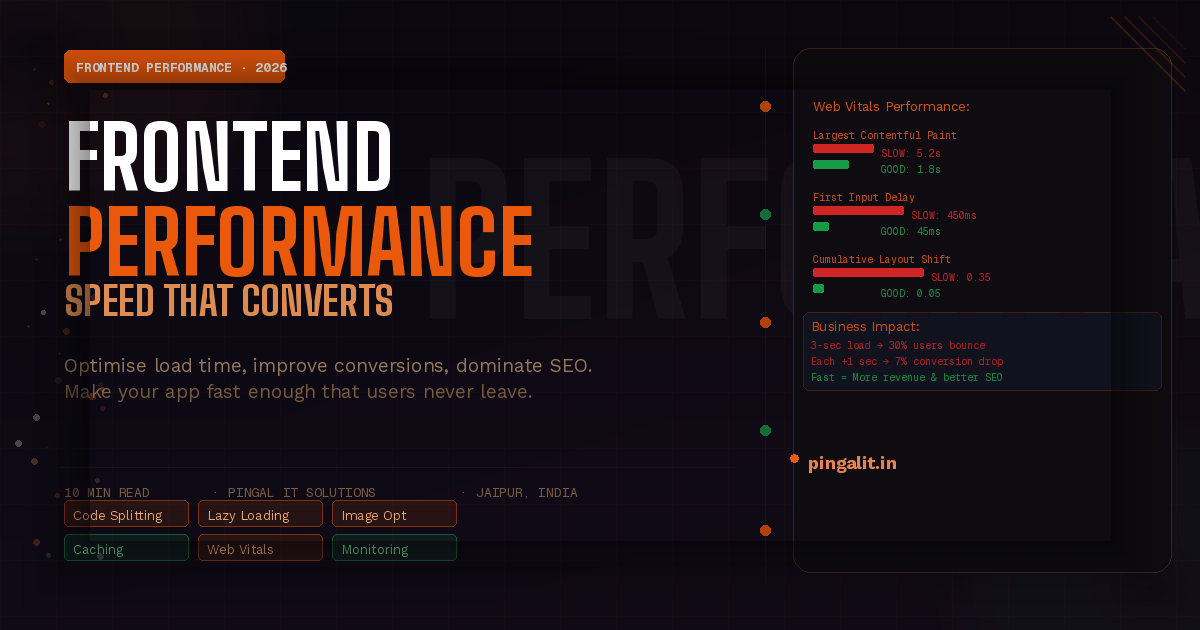
30% of users will abandon a page that takes longer than 3 seconds to load. For every additional second of load time, conversion rates drop by 7%. A 1-second difference in page speed can mean millions of dollars in lost revenue.
Yet most web applications are slow. They ship unoptimised JavaScript bundles. They load images at full resolution on mobile. They make dozens of API requests that could be cached. They render 500 DOM nodes when 50 would suffice.
The frontend is often where performance problems hide. Backend is fast. Database is optimised. Infrastructure scales. But the frontend loads a 5 MB bundle and the user experience suffers.
This guide explains frontend performance optimization: how to measure it, why it matters, and what techniques actually work in 2026.
The Cost of Slow Frontends
- Lost conversions — 30% of users abandon after 3 seconds. A 1-second delay costs millions in revenue.
- SEO penalty — Google ranks slow sites lower. Page speed is a ranking factor.
- Increased bounce rate — slow sites have 2-3x higher bounce rates
- Mobile users impacted most — 70% of mobile users abandon if a page takes longer than 3 seconds on 4G
- User perception — users perceive slow apps as broken, even if they're technically functional
Fast frontends aren't nice-to-have. They're business-critical.
Web Vitals — The Metrics That Matter
Google defines three Core Web Vitals that matter for user experience and SEO:
1. Largest Contentful Paint (LCP) — How Fast Content Appears
How long until the largest visible element (headline, image, block of text) is rendered and visible to the user.
Target: Under 2.5 seconds | Acceptable: 2.5-4 seconds | Poor: Over 4 seconds
LCP measures perceived speed. A page can be interactive but feel slow if content takes 5 seconds to appear.
2. First Input Delay (FID) — How Responsive the App Is
Time between a user clicking/typing and the browser responding. If the main thread is blocked by JavaScript, FID gets slow.
Target: Under 100ms | Acceptable: 100-300ms | Poor: Over 300ms
Users notice delays over 100ms. A 300ms delay feels like lag.
3. Cumulative Layout Shift (CLS) — Visual Stability
How much the page layout shifts while loading. If ads load after the headline, pushing text down, that's layout shift.
Target: Under 0.1 | Acceptable: 0.1-0.25 | Poor: Over 0.25
Layout shift is frustrating. Users try to click a button; it moves; they click the wrong thing.
Why Frontends Are Slow — The Root Causes
1. JavaScript Bundle Size
Most slow sites send massive JavaScript bundles. A typical React app ships 100-300 KB of JavaScript. On slow 4G (common globally), that's 1+ seconds just to download.
Fix: Code splitting, lazy loading, tree shaking, minification
2. Unused CSS and JavaScript
Loading libraries for features you don't use. Shipping CSS for styles that never get applied.
Fix: Audit dependencies. Remove unused code. Use CSS purging tools.
3. Unoptimised Images
Sending a 4 MB image on a page where 500 KB suffices. Sending desktop-resolution images to mobile devices.
Fix: Compress images. Serve different sizes to different devices. Use modern formats (WebP).
4. Render-Blocking Resources
CSS and JavaScript that block page rendering. The browser can't show anything until these load.
Fix: Defer non-critical JavaScript. Inline critical CSS. Load fonts asynchronously.
5. Synchronous API Calls
Page waits for API responses before rendering. If the API is slow, the page is slow.
Fix: Lazy load API data. Show skeleton screens while loading. Cache aggressively.
6. Main Thread Blocking
JavaScript does heavy computation on the main thread, blocking user interactions. Page feels unresponsive.
Fix: Move work to workers. Break up long tasks. Optimise algorithms.
Frontend Performance Optimization Techniques
1. Code Splitting and Lazy Loading
Load JavaScript only when needed. Don't load the admin panel code if the user is on the public page.
Split your bundle into:
- Critical bundle — needed immediately (app shell, navigation)
- Route bundles — loaded when the user navigates to that route
- Component bundles — loaded when a component is needed
Tools: Webpack, Vite, Next.js, Remix
2. Tree Shaking and Minification
Remove unused code and minify what remains. A library might export 100 functions; you use 5. Tree shaking removes the other 95.
Tools: Webpack, Rollup, Terser, esbuild
3. Image Optimization
- Compress — use tools like ImageOptim, TinyPNG
- Resize — serve different sizes to different devices (srcset)
- Format — use WebP for modern browsers; fall back to JPEG/PNG
- Lazy load — only load images when they're about to be visible
- CDN — serve images from CDN close to users
4. Caching Strategy
- Browser cache — tell browsers to cache assets for 1 year (versioned filenames)
- HTTP caching — cache responses in CDN; serve from CDN, not origin
- Service Worker — offline caching; serve cached assets even if network is down
- API response caching — cache API responses in browser; revalidate periodically
5. Critical Rendering Path Optimisation
- Inline critical CSS — styles needed to render above-the-fold content
- Defer non-critical CSS — load secondary styles asynchronously
- Defer JavaScript — load non-critical scripts with defer/async
- Preload critical resources — hint to browser about important resources
6. Skeleton Screens and Progressive Enhancement
Show a skeleton/loading state immediately. Fill in real content as it arrives. Users perceive the page as faster because something appears immediately.
7. Web Workers for Heavy Computation
Move expensive JavaScript off the main thread. Parse data, process images, run algorithms in a worker. Main thread stays responsive to user input.
8. Font Optimization
- Avoid system fonts or use web-safe fonts (faster than custom)
- Use font-display: swap — show fallback font immediately; swap when custom font loads
- Subset fonts — only include characters you use
- Use variable fonts — one file instead of multiple weights/styles
Performance Testing and Monitoring
Measure Before and After
You can't optimise what you don't measure. Use:
- Lighthouse — audit tool built into Chrome DevTools. Scores 0-100.
- WebPageTest — detailed waterfall charts showing load timeline
- PageSpeed Insights — Google's tool; measures field data + lab data
- Real User Monitoring (RUM) — measure actual user experience in production
Set Performance Budgets
Define limits: "JavaScript bundle must be under 100 KB". "Largest image must be under 500 KB". Enforce in CI/CD. When a change exceeds the budget, the build fails.
Monitor in Production
Lab testing (Lighthouse) is useful but artificial. Real users on real networks have different experiences. Monitor real user metrics continuously.
Tools: DataDog, New Relic, Sentry, custom analytics
Frontend Framework Performance in 2026
| Framework | Initial Bundle (gzipped) | Best For | Performance Notes |
|---|---|---|---|
| React 19 | ~42 KB | Complex interactive apps, SPAs | Server Components reduce client-side code |
| Vue 3 | ~34 KB | Progressive enhancement, simpler apps | Smaller bundle; good performance defaults |
| Svelte | ~14 KB | Performance-critical apps | Compiles to vanilla JS; smallest runtime |
| Astro | ~0 KB (by default) | Static content + islands of interactivity | Ship zero JavaScript by default |
| Next.js 15 | Varies (code splitting) | Full-stack React apps | Server rendering reduces client-side work |
The framework matters, but optimization technique matters more. A well-optimised React app outperforms an poorly-optimised Svelte app.
Performance Optimization Checklist
- ✅ Measure current performance (Lighthouse, WebPageTest)
- ✅ Set performance budget (bundle size, LCP, FID, CLS)
- ✅ Code split on routes and components
- ✅ Tree shake unused code
- ✅ Minify and compress
- ✅ Optimise images (compress, resize, lazy load)
- ✅ Optimise fonts (subset, variable fonts, swap strategy)
- ✅ Inline critical CSS; defer non-critical
- ✅ Defer JavaScript; async load non-critical scripts
- ✅ Implement caching strategy (browser, CDN, Service Worker)
- ✅ Monitor real user metrics in production
- ✅ Set up performance alerts (notify when metrics regress)
How Pingal IT Solutions Optimises Frontends
At Pingal IT Solutions, every frontend we build is optimised for performance from day one.
- Performance-first architecture — we design with performance in mind, not add it later
- Code splitting strategy — we split bundles by route, component, and intent
- Image optimisation — we compress, resize, and serve optimal formats
- Caching strategy — browser cache, CDN caching, Service Workers
- Monitoring and alerts — we track metrics continuously and alert on regressions
- Performance budgets — we enforce size limits in CI/CD
Our frontend optimization services include:
- Performance audit and diagnosis
- Code splitting and lazy loading implementation
- Image and asset optimisation
- Caching strategy design
- Web Vitals monitoring and improvement
- Performance testing and benchmarking
Conclusion
Frontend performance isn't optional. It's a competitive advantage. Fast apps convert better, rank higher in search, and users love them.
The techniques to build fast frontends are well-known. The tools are free. The only barrier is prioritisation. Too many teams optimise for feature velocity at the expense of performance.
Invest in frontend performance. Your users will thank you. Your revenue will reflect it.
Is your frontend slow? Talk to Pingal IT Solutions — we'll audit your frontend and show you exactly where milliseconds are being lost and how to reclaim them.